Portfolio Case Study
Football Match Tracker · 2023–2024

Unifying live football data into one Match Tracker

I helped define the rules that turned different sports-data feeds into consistent live match behavior across web, mobile web, and app.

Role · Senior Product Designer
Focus · Product definition, data mapping, interaction, animation specifications
Status · Launched to production
Production sequenceLive match interface
The challenge

Different providers describe the same match differently.

Event codes, locations, team information, and supporting data could vary from one provider to another.

The product needed to hide that complexity and give users one clear, consistent experience during a live match.

Raw provider inputs

Provider 1

event_code_id
262
zone
CR_R

Provider 2

Type
5

Provider 3

team
Home
isConfirmed
true

Provider 4

fixtureActionTypeId
108
sendTypeId
5
Feed Aggregator Map · Normalize · Standardize

Common MT action

Corner Kick Home · Top Right
My role

Turning product goals into rules engineering could implement.

I worked closely with the Product Manager and Department Head to turn product goals into clear rules for engineering.

I mapped provider data and specified how the frontend should handle interactions, animations, pitch positions, responsive layouts, and match states. I also created the supporting design mockups.

I also worked with a Systems Analyst who consolidated many of these requirements in the formal SRS and documented the broader system architecture and implementation flows.

Business requirements → product behavior → technical specification → visual implementation
How the solution worked

Turn different data feeds into one consistent experience.

01 Sports data providers
02 Normalize the feeds
03 Match Tracker and content
04 Web, mobile and app

Simplified product architecture

Sports data feed Provider 1
Sports data feed Provider 2
Sports data feed Provider 3
Sports data feed Provider 4

Feed Aggregator

  1. Ingest
  2. Parse
  3. Normalize
  4. Prioritize

One common Match Tracker model

Match Tracker + Match Content

  • Match actions
  • Ball position
  • Lineups
  • Statistics
  • Supporting content
Web · Mobile web · App
Provider-specific feeds were normalized into one product model before reaching each customer-facing surface.
Key contributions

Turning raw provider data into consistent product behavior.

1. Standardizing provider data

I defined how provider-specific fields and football events should map into common Match Tracker behavior.

Different providers could describe the same match state in different ways. Ball position, for example, could arrive as a pitch zone from one provider and X/Y coordinates from another. Both had to resolve into the same frontend behavior.

Some events also required multiple fields or related feed events to be interpreted together before the correct product state could be shown.

Ball position normalization

Provider 1 Pitch zone
  • Safe
  • Attack
  • Dangerous Attack
Provider 2 X/Y coordinates
Field
posX
Field
posY
Feed Aggregator Normalize provider ball-position data
Standard X/Y Model
Match Tracker Ball on pitch
Different feed formats, one product model. Provider-specific location data was normalized before reaching the Match Tracker.

2. Turning live data into visual behavior

I guided the designers on how match states should appear on the pitch, including ball position, attacking zones, action states, and animation behavior. They translated those requirements into mockups and animation assets.

Together, these specifications turned provider event and zone data into consistent visual states for moments such as Free Kick, Attack, Dangerous Attack, and Corner Kick.
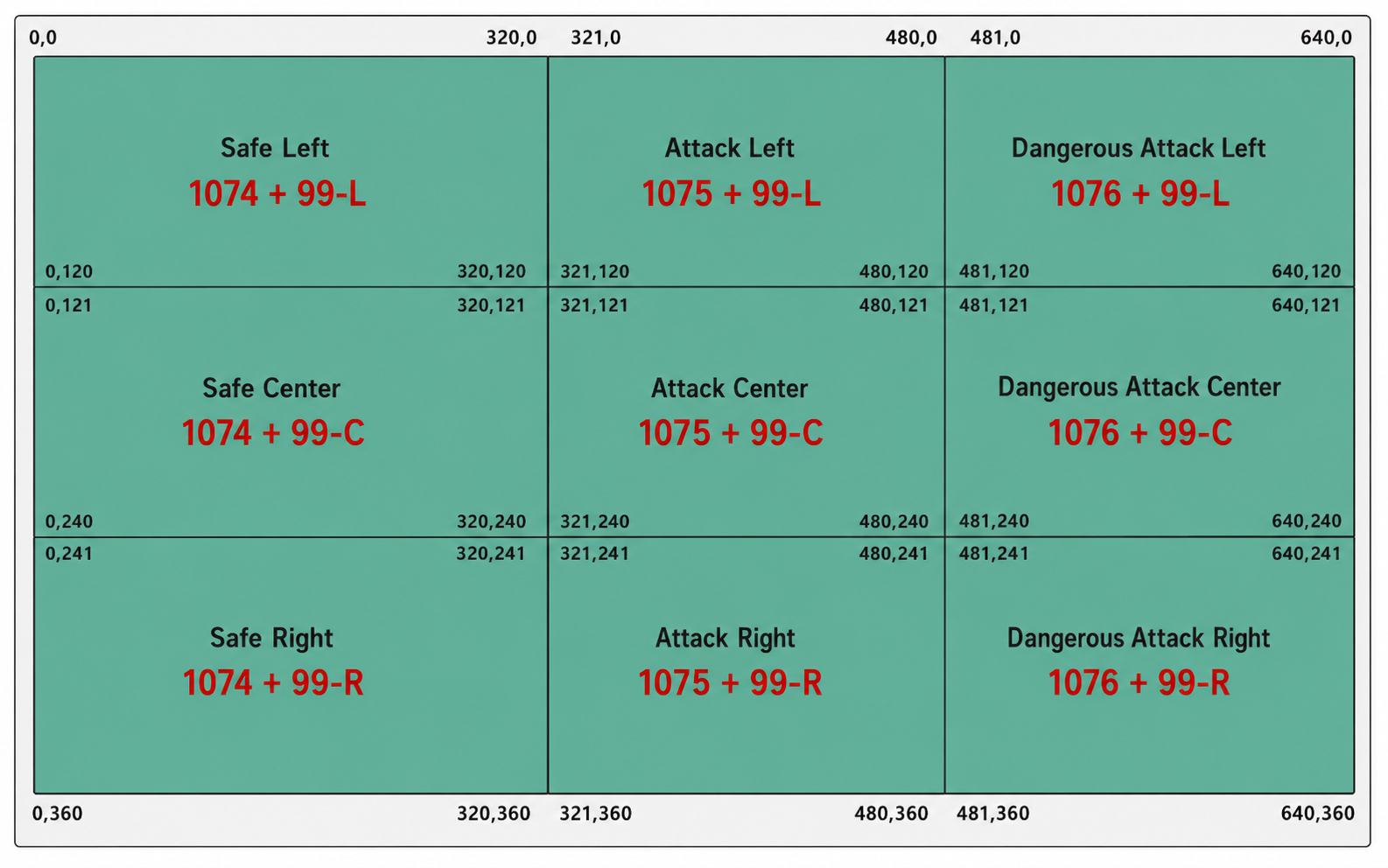
Behavior specification Provider data → pitch-zone rules → frontend visual state
Pitch-zone and ball-position rules showing Safe, Attack, and Dangerous Attack zones with coordinate boundaries.
Pitch-zone rules used to map incoming position data into visual match states.

3. Defining supporting match content

The experience extended beyond the pitch animation. It also included Standings, Head to Head, and other supporting match views.

I defined how these views should open, load, and behave depending on match state and data availability.
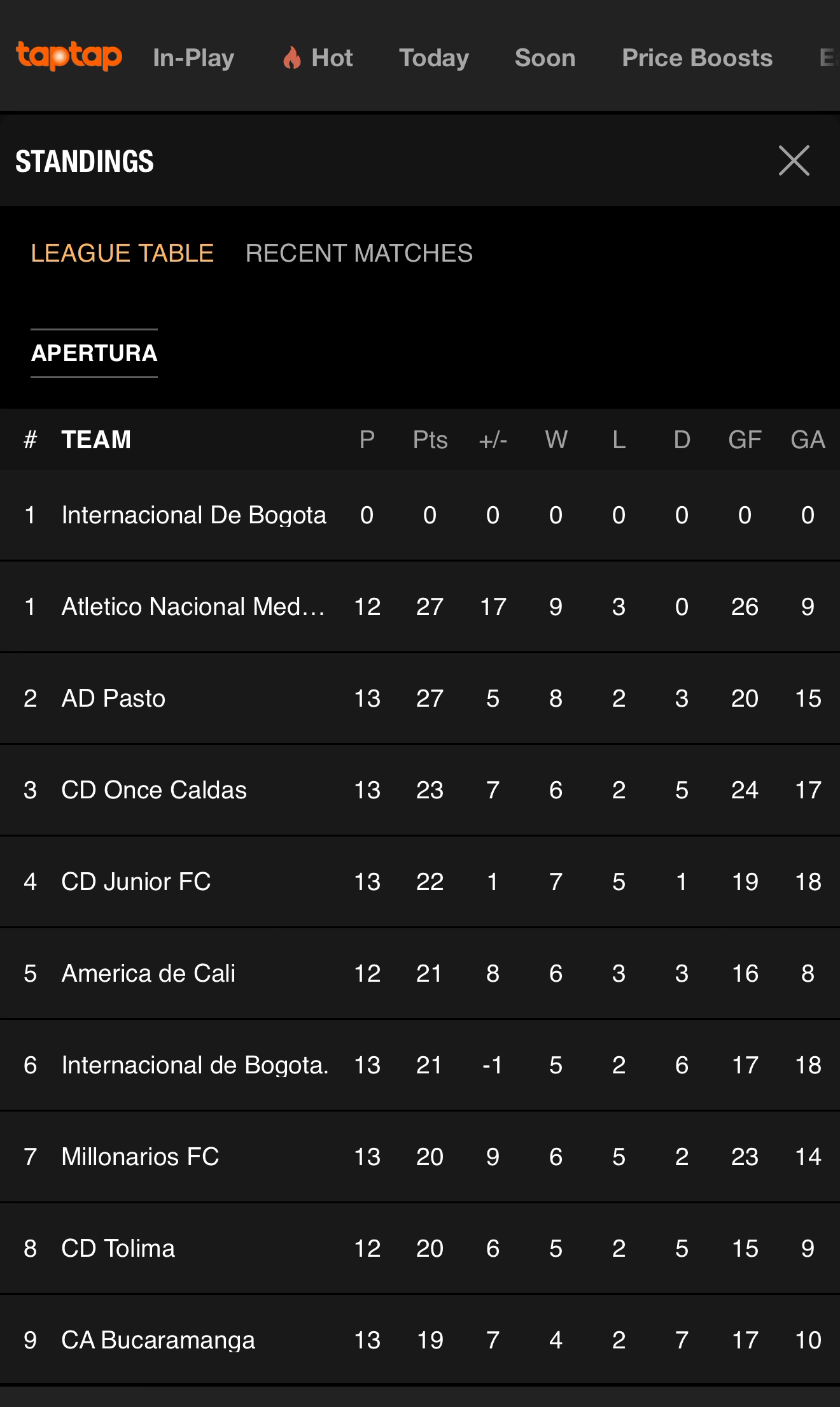
Supporting match content Product screenshots → information architecture
Standings view showing the Apertura league table as supporting match context.

Standings

Competition standings shown as supporting match context.
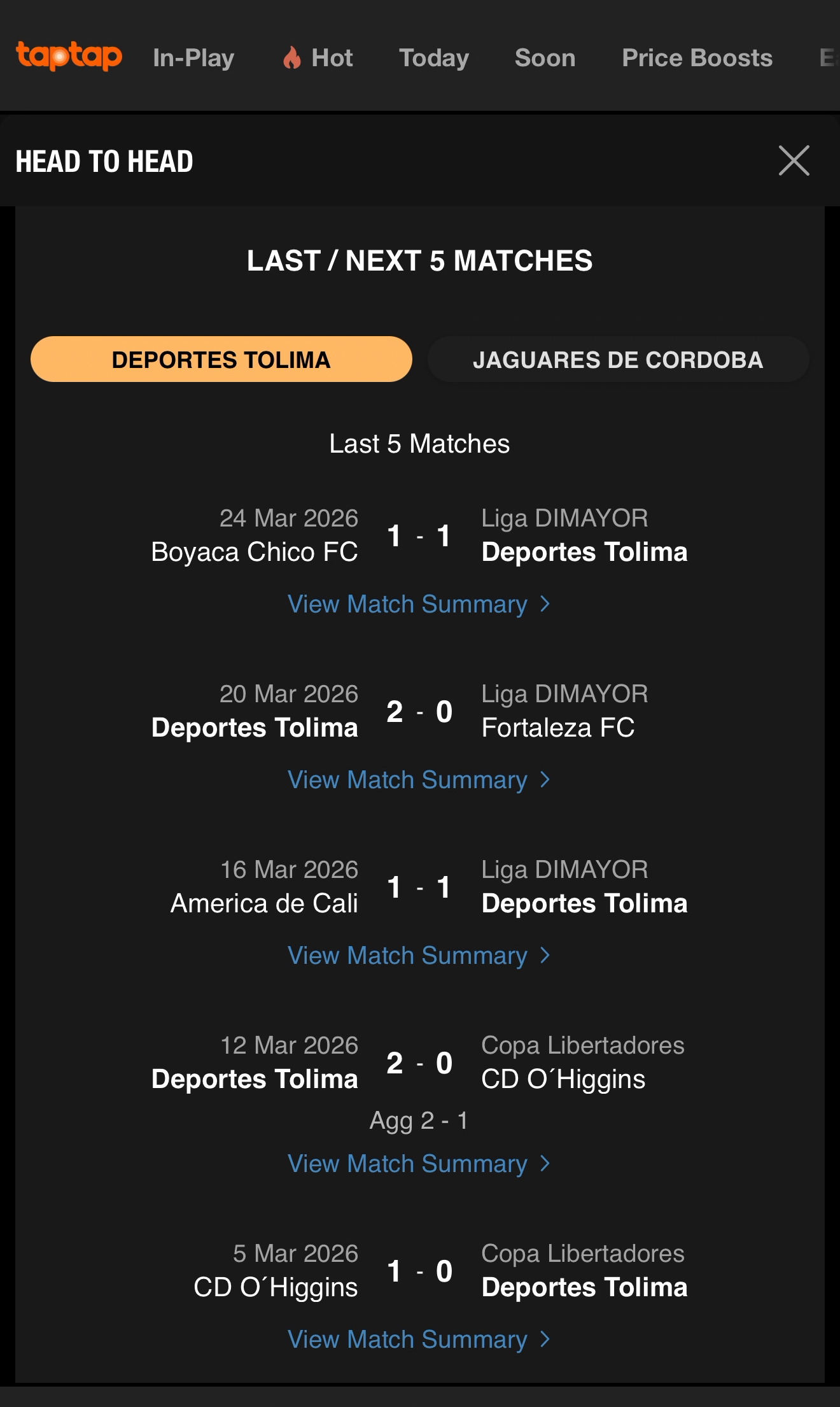
Head to Head view comparing recent matches for Deportes Tolima and Jaguares de Cordoba.

Head to Head

Pre-match comparison surfaced when matchup data is available.

Information architecture · Head to Head Five content groups, one comparison view.

I mapped the information hierarchy behind Head to Head before translating it into the supporting widget.

Last / Next 5 Matches

Team 1
  1. Match 01
  2. Match 02
  3. Match 03
  4. Match 04
  5. Match 05
Team 2
  1. Match 01
  2. Match 02
  3. Match 03
  4. Match 04
  5. Match 05

Previous Meetings

  1. Match 01
  2. Match 02
  3. Match 03
  4. Match 04
  5. Match 05

Season / Tournament Summary

  • Position
  • Wins
  • Draws
  • Losses
  • Matches Played
  • Total Goals / Match
  • Goals Conceded / Match
  • Clean Sheets
  • Leading at HT
  • Drawing at HT
  • Losing at HT

Goals Over / Under

0.5Full Time1st Half2nd Half
1.5Full Time1st Half2nd Half
2.5Full Time1st Half2nd Half
3.5Full Time1st Half2nd Half
4.5Full Time1st Half2nd Half
5.5Full Time1st Half2nd Half

Player Statistics

Goals
  • Team 1
  • Team 2
Cards
  • Team 1
  • Team 2
Assists
  • Team 1
  • Team 2

4. Designing across devices and match states

I specified how the experience should behave across desktop, mobile web, and app, including different pre-start and in-play states.

This included rules for which content should appear, expand, collapse, or remain unavailable depending on the context.
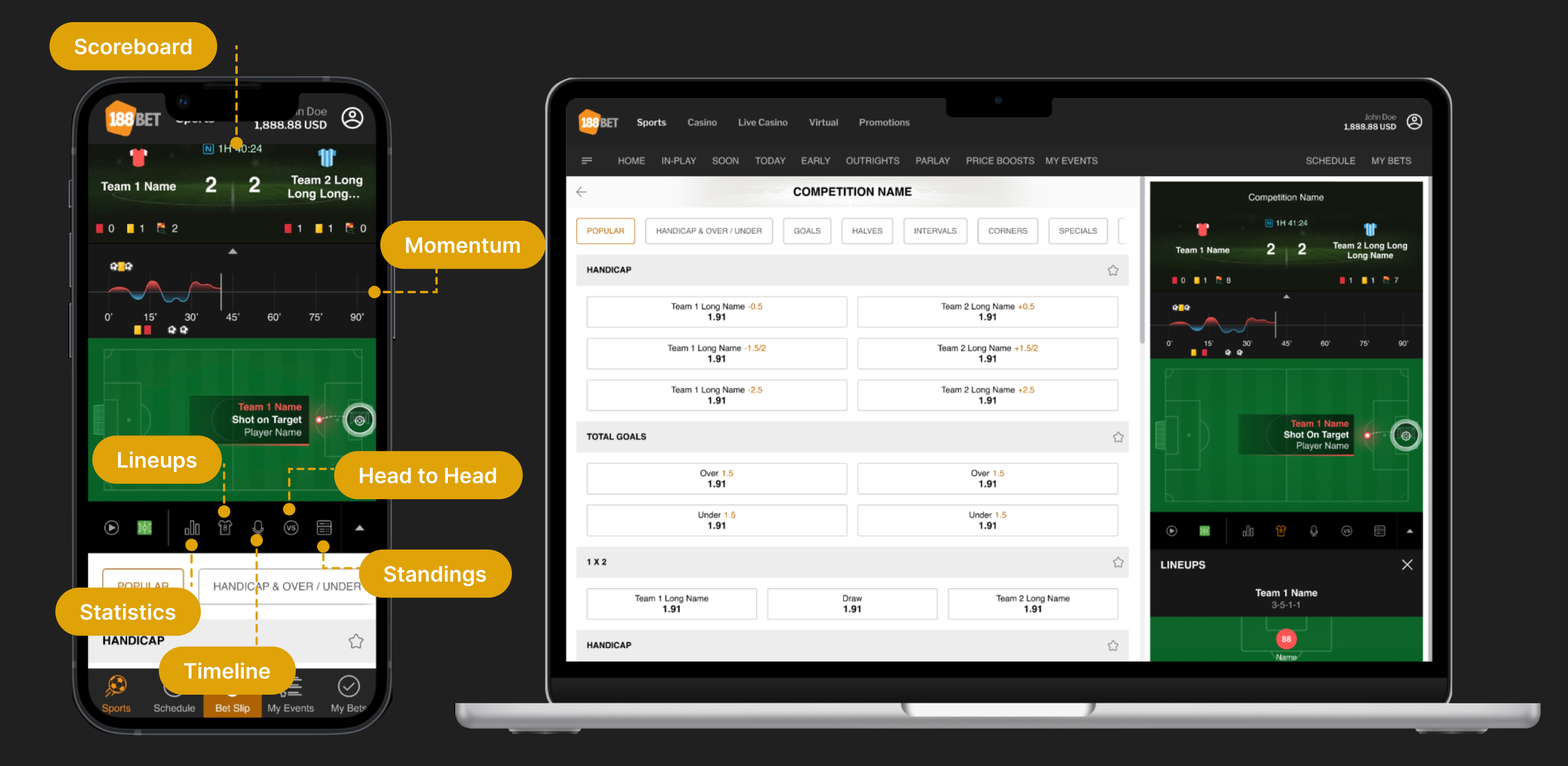
Responsive product system Supporting content across mobile and desktop
Cross-device product evidence View full-size image
Cross-functional delivery

From product behavior to implementation.

01 Product / Design
My role

I analyzed provider feeds, defined the correct product behavior, and created wireframes and team-alignment materials.

Tools Power Query · Figma
02 Motion Design
Collaborator

The animation designer translated the required behavior into motion while retaining creative control over the animation itself.

Production tool Adobe After Effects
03 Frontend Implementation
Implementation

Approved behavior and animation assets were integrated into the Match Tracker frontend.

Technology Lottie · JavaScript
Outcome

The Match Tracker launched into production.

The Football Match Tracker was released across the platforms covered by the project. The site was later discontinued following regulatory changes, so the live product is no longer publicly available.